The Ultimate Website Redesign Checklist for 2026: Improve Search Engine Optimisation, User Experience and Conversions

When people visit your website, it is often the first time they see your business. As technology changes and people expect more, a website that is old can hurt your search engine rankings, make people not trust you and reduce the number of conversions. In 2026, businesses need fast websites that work well on mobile phones, are secure, look good and are optimised for search engines.Whether you are redesigning a store, a company website, a portfolio or a service-based business website, following a structured website redesign checklist helps you avoid making expensive mistakes while improving search engine optimisation, user experience and overall business performance.This comprehensive website redesign checklist covers every step before, during and after launching your new website.
Why Website Redesign Matters in 2026
Redesigning a website is more than changing the colours and layouts. It is about improving performance, usability, search engine optimisation, accessibility and conversion optimisation.
Benefits of a Website Redesign
The website redesign has benefits, including better search engine rankings, faster loading speed, improved mobile experience, increased customer trust, higher lead generation, better conversion rates, stronger brand identity, enhanced website security, easier content management and future-ready technology.
The Ultimate Website Redesign Checklist
1. Define Your Website Goals
Start by figuring out why you are redesigning your website. The website redesign is important because it helps you achieve your business objectives. Common objectives include generating leads, increasing online sales, improving search rankings, reducing bounce rate, modernizing the design, improving website speed and strengthening brand identity.
Having goals ensures every design decision supports your business objectives, which is crucial for the website redesign.
2. Audit Your Existing Website
Before making changes, evaluate your website. The website redesign checklist includes reviewing performing pages, high-ranking keywords, organic traffic, broken links, duplicate content, bounce rate, conversion rate, page speed and user behaviour.
Understanding what is working helps preserve search engine optimisation assets during the website redesign.
3. Analyse Your Competitors
Study competitors that rank well in search engines. The website redesign involves evaluating website layout, navigation, landing pages, content quality, call-to-action placement, mobile responsiveness, page speed and blog strategy.
Use competitor insights to identify opportunities for improvement without copying their design, which’s an important part of the website redesign.
4. Create a User-Friendly Navigation
Visitors should easily find the information they need. The website redesign checklist includes practices such as simple menu structure, clear page labels, logical hierarchy, sticky navigation, search functionality and breadcrumb navigation.
An organised navigation improves both user experience and search engine optimisation, which are crucial for the website redesign.
5. Prioritise Mobile-First Design
Most users browse websites on smartphones. The website redesign involves ensuring your redesigned website offers layouts, fast mobile loading, touch-friendly buttons, readable typography, optimised images and mobile-friendly forms.
Google also prioritises friendly websites in search rankings, which is an important consideration for the website redesign.
6. Improve Website Speed
Website speed directly affects user satisfaction and search engine optimisation. The website redesign checklist includes optimising by compressing images using image formats enabling browser caching, minifying CSS and JavaScript, reducing unnecessary plugins, using a Content Delivery Network and choosing reliable hosting.
A faster website improves engagement and conversions, which is a key goal of the website redesign.
7. Preserve Your Search Engine Optimisation Rankings
Many websites lose traffic after a redesign because search engine optimisation is overlooked. The website redesign involves search engine optimisation checklist items such as keeping important URLs, setting up 301 redirects, updating XML sitemap, maintaining title tags, optimising meta descriptions using proper heading structure, adding internal links, optimising image alt text and fixing broken links.
Always monitor rankings after launching the redesigned website, which’s a critical part of the website redesign.
8. Refresh Content
A redesign is the opportunity to improve website content. The website redesign involves updating service pages, product descriptions, homepage copy, About Us page, Contact page, FAQs and blog posts.
Focus on creating keyword-rich and user-focused content, which is essential for the website redesign.
9. Optimise for User Experience
Excellent user experience encourages visitors to stay. The website redesign involves improving user experience by using layouts, easy readability, consistent branding, white space, clear buttons, intuitive navigation and faster interactions.
Good user experience also contributes to search engine optimisation performance, which is a key consideration for the website redesign.
10. Strengthen Website Security
Security builds customer trust. The website redesign involves including an SSL certificate, HTTPS, login, strong passwords, firewall protection, malware scanning, regular backups and updated CMS and plugins.
Secure websites perform better in search results. Protect user data, which is crucial for the website redesign.
11. Optimise for Conversions
A beautiful website should also generate leads and sales. The website redesign involves improving conversions with Call-to-Action contact forms, live chat, testimonials, trust badges, case studies, a simple checkout process and lead magnets.
Every page should guide visitors toward a desired action, which’s an important part of the website redesign.
12. Improve Accessibility
An accessible website provides an experience for all users. The website redesign involves accessibility checklist items such as alt text for images, keyboard navigation, heading structure, sufficient colour contrast, readable fonts, descriptive links and accessible forms.
Accessibility also supports search engine optimisation and usability, which are key considerations for the website redesign.
13. Test Before Launch
Never launch without testing. The website redesign involves checking responsiveness, browser compatibility, broken links, contact forms, page speed, SSL certificate, analytics tracking, navigation, Call-to-Action buttons and payment gateways.
Testing helps prevent issues that could affect user experience, which’s crucial for the website redesign.
14. Monitor Performance After Launch
The work does not stop after publishing the redesigned website. The website redesign involves tracking traffic, keyword rankings, bounce rate, Core Web Vitals, conversion rate, form submissions, page load speed and user engagement.
Use insights to improve your website, which is an ongoing process for the website redesign.
Common Website Redesign Mistakes to Avoid
Avoid these errors: ignoring search engine optimisation during redesign, removing valuable content, changing URLs without redirects, poor mobile optimisation, slow loading pages, weak calls-to-action, confusing navigation, not testing before launch, overcomplicated design and ignoring analytics.
Avoiding these mistakes ensures a redesign and protects your search visibility, which is a key consideration for the website redesign.
Best Tools for a Website Redesign
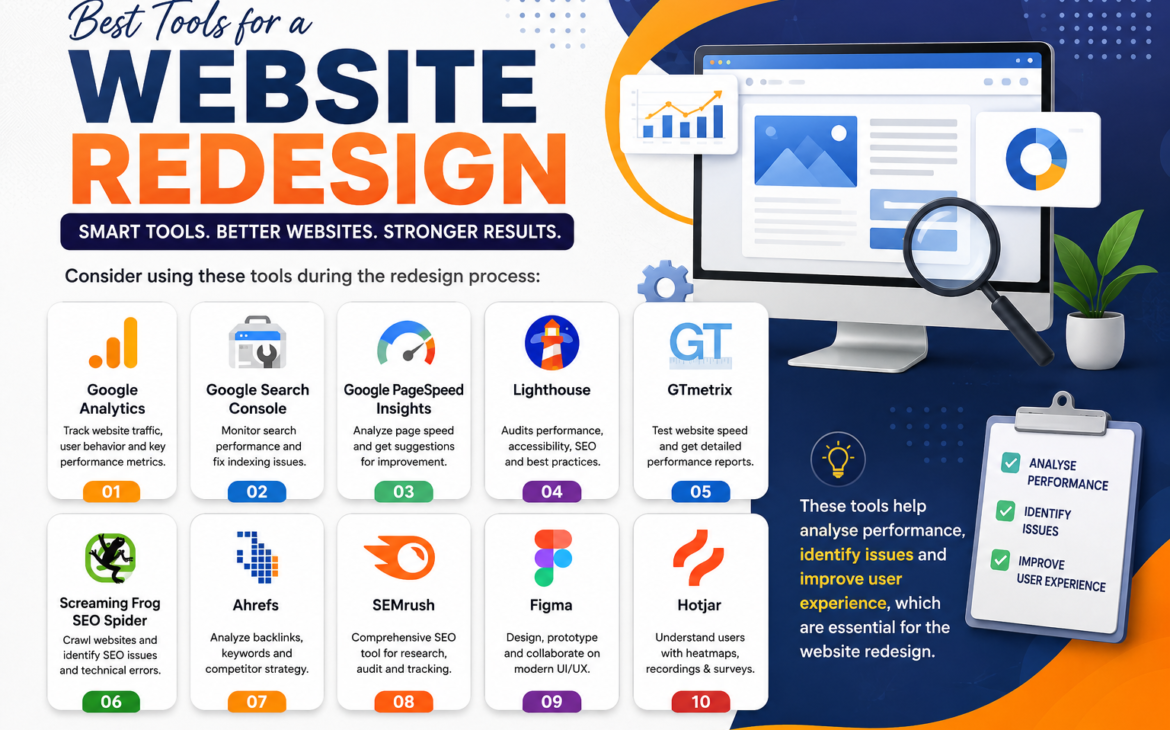
Consider using these tools during the redesign process: Google Analytics, Google Search Console, Google PageSpeed Insights, Lighthouse, GTmetrix, Screaming Frog SEO Spider, Ahrefs, SEMrush, Figma and Hotjar.
These tools help analyse performance, identify issues and improve user experience, which are essential for the website redesign.
Final Website Redesign Checklist
Before launching, confirm that you have defined business goals, completed a website audit, planned the site structure, designed for devices, improved loading speed, optimised search engine optimisation elements, updated website content, enhanced user experience, added conversion-focused calls-to-action, improved accessibility, strengthened security, tested every page, configured analytics, set up redirects and monitored post-launch performance.
Following this checklist significantly reduces the risk of losing traffic while helping your website perform better, which is the ultimate goal of the website redesign.
Conclusion
A website redesign is an investment that can improve your online visibility, strengthen your brand and increase conversions. By following a checklist, businesses can create websites that are fast, user-friendly, secure and optimised for search engines.
From defining clear goals and preserving search engine optimisation to improving user experience and testing thoroughly before launch, every step plays a vital role in the success of your redesigned website. Regular. Continuous optimisation after launch ensures your website remains competitive and continues delivering value in 2026 and beyond.
Frequently Asked Questions
1. How often should a website be redesigned?
Most businesses should consider redesigning their website every 2–4 years. Whenever there are significant changes in branding, technology or user expectations.
2. Will a website redesign affect search engine optimisation?
Yes. If not planned correctly, rankings may drop. Preserving URLs, implementing 301 redirects and maintaining on-page search engine optimisation elements help protect traffic.
3. What is the important part of a website redesign?
Balancing user experience, website speed, search engine optimisation, mobile responsiveness and conversion optimisation is essential for a redesign.
4. How long does a website redesign take?
The timeline depends on the website’s size and complexity. A basic redesign may take a week, while larger websites can take several months.
5. How can I measure the success of a website redesign?
Track metrics such as traffic, keyword rankings, page speed, bounce rate, conversions, user engagement and lead generation using analytics tools.
Thank you for reading
Buy Web Hosting at an affordable price: Buy Now.
If you want to build your website at an affordable price, contact www.nextrtechnology.com
Read more blogs: https://www.nextrtechnology.com/blog/